
Your data, your way. Easily log CAN bus data via SD / WiFi / LTE - or stream it via USB / Ethernet.
Process the interoperable data in your favorite tools - or via 100% free open source software/APIs.
Perfect for vehicle telematics, OEM development, CAN diagnostics and more.
Key features

|
PLUG & PLAY
No setup needed - power up and start to log, stream or enrich CAN data out-the-box |

|
PRO SPECS
Built for engineers. Used by 10K+ OEMs. Top-tier tech specs |

|
TRULY COMPACT
Devices are smaller than 8 x 7 x 3 cm and light-weight (100 G). Rugged alu enclosures |

|
ANY CAN BUS
Record any CAN data - incl. CAN FD, J1939, OBD2, UDS, CANopen, NMEA, CCP/XCP, ... |

|
CONNECTED
Access your CAN data your way. SD. WiFi. LTE. USB. Ethernet. You own your data. |

|
CONFIGURABLE
Configure filters, silent mode, encryption, cyclic logging, triggers, transmit lists & more |

|
FREE SOFTWARE
100% free open source software/API tools. Zero subscriptions. Interoperable formats. |

|
MADE IN DK
Danish engineering. Fast global shipping. Excellent free support |
Trusted by engineers at 10K+ OEMs


— Andrew Nolan, Connected Services at Volkswagen Group of America
learn more



![Agricultural Machinery Data Logger [CAN Bus Data + MATLAB]](https://www.csselectronics.com/cdn/shop/files/john-deere-logo.png)




![CAN Bus Troubleshooting at CERN [CANopen WiFi Gateway]](https://www.csselectronics.com/cdn/shop/files/cern-logo.png)
Which CAN logger/interface do you need?
CANedge - pro specs 2 x CAN/LIN logger
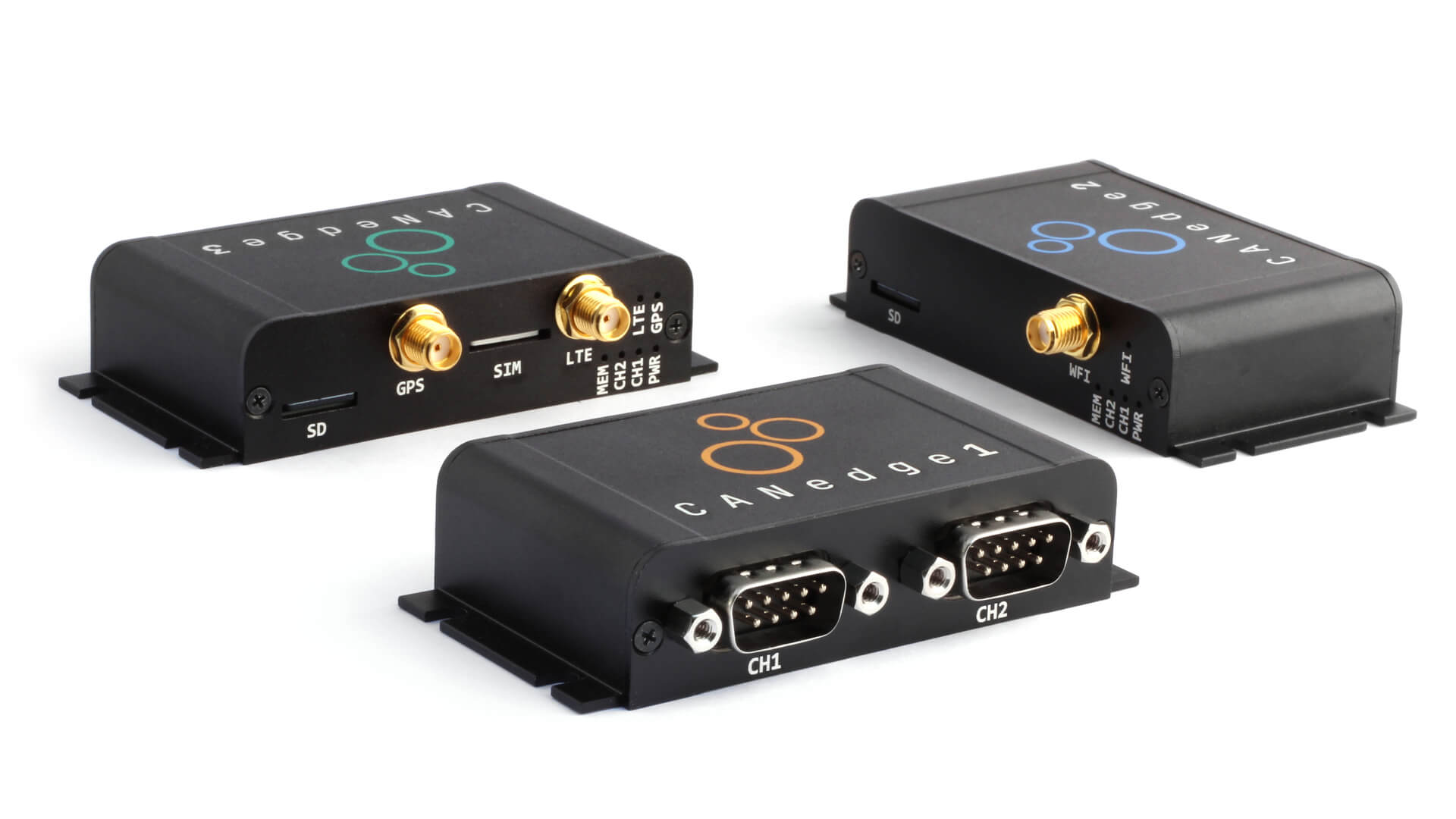
The CANedge is a next generation CAN/LIN data logger with SD. It combines ease-of-use with pro specs and powerful configuration options. The raw data can be processed in your favorite tools - or via 100% free open source software/APIs. Optional WiFi, LTE and GPS/IMU.
learn more 5 min videoNEW: CANsub - CAN interface with USB/Ethernet
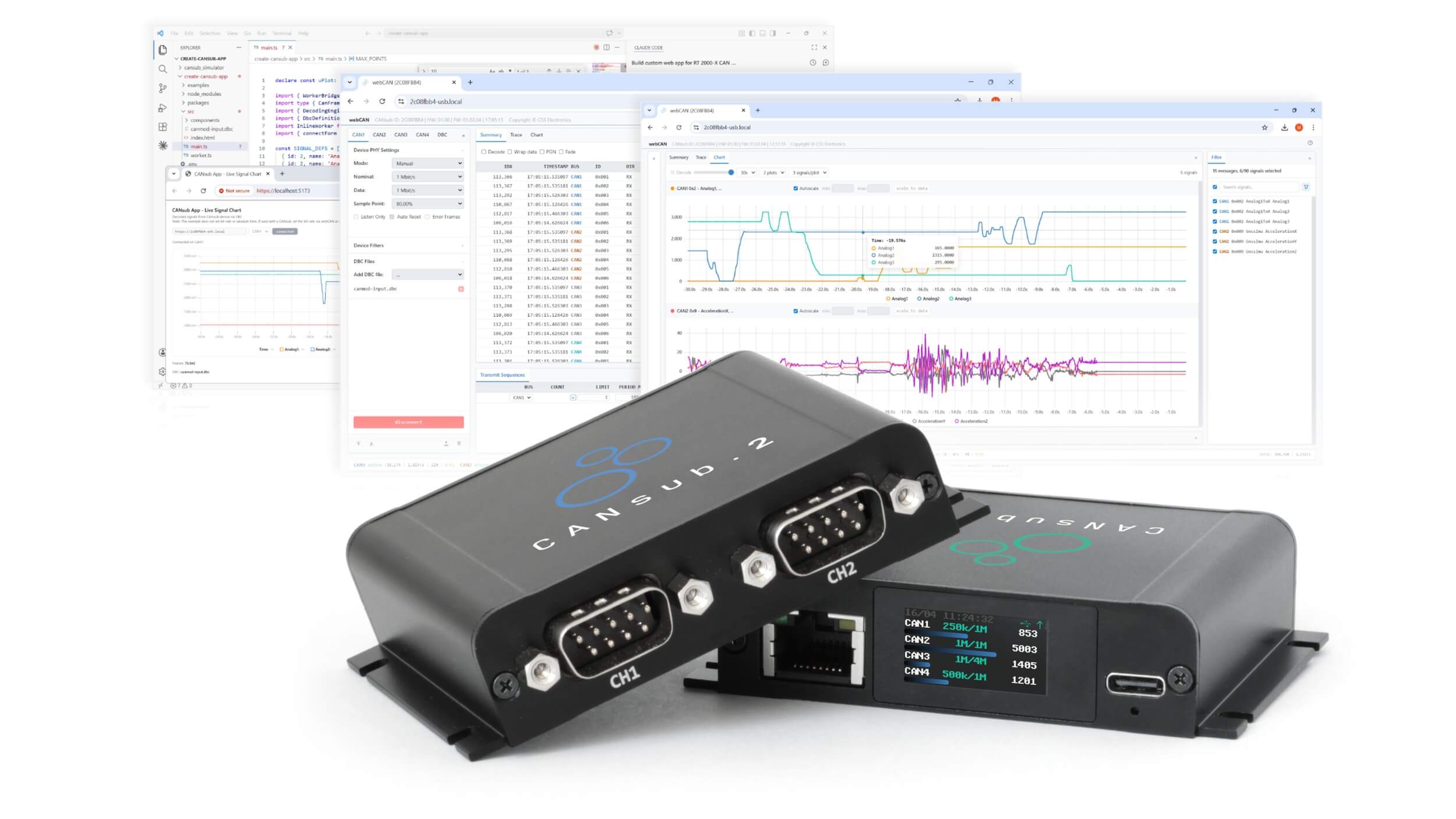
The CANsub lets you stream CAN data in real-time via USB/Ethernet - with pro specs, built-in LCD display and zero software installation. The powerful webCAN app runs on the CANsub: Simply open the device URL in your browser to instantly send/receive CAN frames, DBC decode data or plot CAN signals.
learn more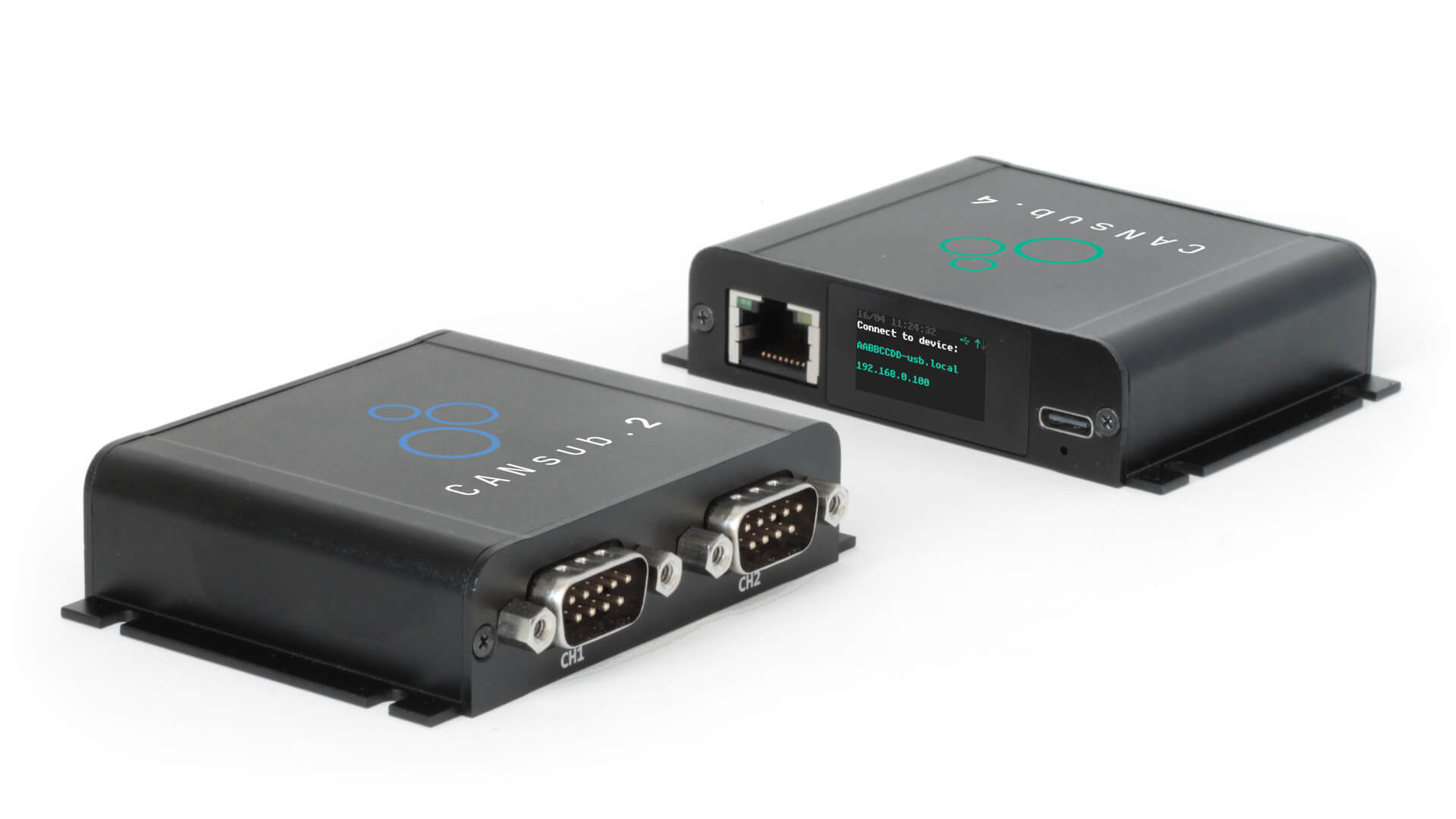

CANmod - sensor-to-CAN modules
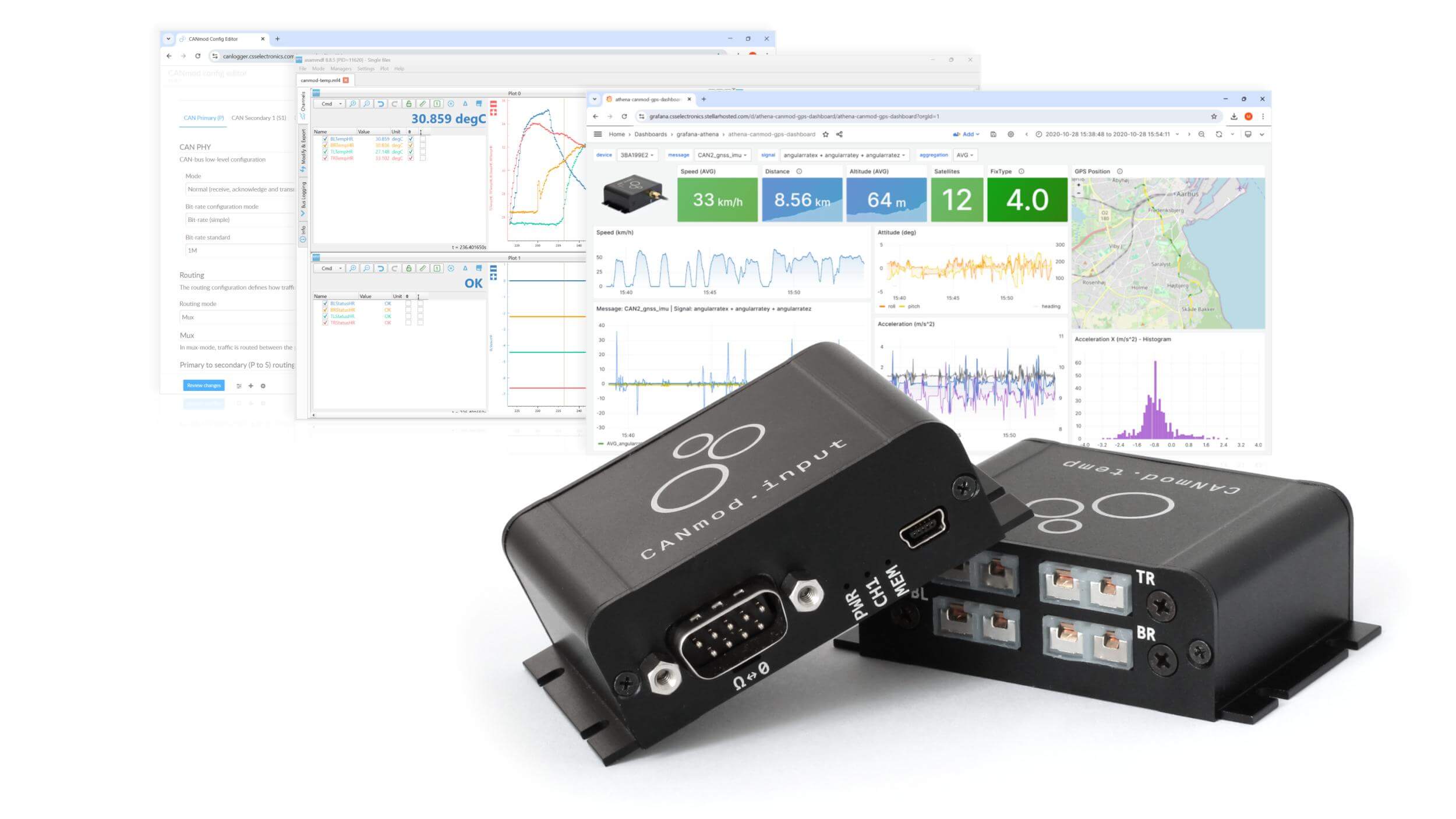
The CANmod lets you convert sensor data (GPS, temperature, analog, 4 x CAN, ...) to CAN frames - for standalone integration with any CAN bus. Ideal for adding data for your ECUs, telematics equipment or CAN bus data loggers - incl. the CANedge. Support optional daisy chaining and USB streaming.
learn more100% free & open source software/API tools
Easily configure devices, process recorded logs or stream live data - all via free open source software/API tools.
Log data with the CANedge and convert, DBC decode and visualize in your favorite tools or browser dashboards. Or stream live CAN data with the CANsub webCAN app - your choice!
learn moreThe three product types serve different use cases - and are often combined:
- Use the CANedge if you want to record CAN data autonomously to an SD card in the field (with no PC connected) for later analysis, and optionally have it pushed to your own server - ideal as a blackbox or OEM telematics device
- Use the CANsub if you want to interact with a live/real-time CAN bus from your PC via USB or Ethernet - send/receive frames, decode signals in real time, debug or sniff
- Use the CANmod if you want to add data to a CAN bus that is not natively on the CAN bus (GNSS, temperature, analog, ...) - either for ECUs/displays on the bus to consume, or to be picked up by a logger such as the CANedge
In short: log with the CANedge, stream with the CANsub, enrich with the CANmod. The three are designed to complement each other - and our free open source software/APIs work seamlessly across all of them.
If you're in doubt which CAN logger to choose, contact us - we always respond fast with quality sparring.
Below is our 'rule of thumb' guidance:
- CANedge1: If you only need to log timestamped data to an SD card
- CANedge2: If you need to log data to an SD card and transfer it via a WiFi access point to your own server
- CANedge3: If you need to log data to an SD card and transfer it via 3G/4G LTE to your own server
If you need to collect data frequently/automatically/remotely, see the CANedge2/CANedge3.
| CANedge1 | CANedge2 | CANedge3 | |
|---|---|---|---|
| CAN & LIN | CANedge1 | CANedge2 | CANedge3 |
| # of CAN channels | 2 | 2 | 2 |
| # of LIN channels | 2 | 2 | 2 |
| CAN FD | Yes | Yes | Yes |
| RTC with battery backup (resolution)
i
All CANedge devices have a real-time clock for
timestamping
each
data frame with the absolute date & time at 0.05 ms (50 µs) resolution.
|
Yes (0.05 ms) | Yes (0.05 ms) | Yes (0.05 ms) |
| #frames/second i
The CANedge is designed for lossless logging at any
busload
and has been
used in various use cases to record 3000+ frames/second (1500+ per channel). In
practice, most CAN bus
applications broadcast between 500-1500 frames/second.
|
3000+ | 3000+ | 3000+ |
| DATA LOGGING | CANedge1 | CANedge2 | CANedge3 |
| SD card logging i
All CANedge devices use an 8 GB SD card by default
(optional
32 GB
upgrade)
|
Yes | Yes | Yes |
| Industrial & extractable SD i
The CANedge enables log file transfer via the extractable
industrial micro
SD card (~80 MB/s)
|
Yes | Yes | Yes |
| Log file format i
The CANedge logs in the MDF4 (.MF4) log file format - a
standardized and
popular binary format for logging e.g. CAN bus and LIN bus data. It is supported by
various existing
software and API tools.
|
MDF4 (.MF4) | MDF4 (.MF4) | MDF4 (.MF4) |
| Cyclic logging i
Cyclic logging lets the device overwrite the oldest file
once
the SD card
is full
|
Yes | Yes | Yes |
| Silent mode | Yes | Yes | Yes |
| Bit-rate auto detection i
The device can auto-detect the bit rate for most
applications.
It is also
possible to select a manual bit-rate from a list of standard bit-rates. Further, the
CANedge supports
advanced bit-rate customization
|
Yes | Yes | Yes |
| Filters & prescaling i
The CANedge supports 64 extended or 128 regular CAN ID
filters
per channel.
Filters can be set to either "acceptance" or "rejection" - and you can define both
"masks" and "ranges"
for the filters. The CANedge supports both Count, Time and Data prescaler
types.
|
Advanced | Advanced | Advanced |
| Transmit lists i
The CANedge supports up to 64 custom transmit frames per
channel
|
Advanced | Advanced | Advanced |
| Control signal (trigger) i
The CANedge supports start/stop logging/transmitting based
on
the presence
of a specific CAN ID or specific signal values (e.g. if EngineSpeed exceeds a
specific
threshold)
|
Advanced | Advanced | Advanced |
| Data compression & encryption i
The CANedge enables optional compression of data to reduce
file size by
50-80%.
Further, the CANedge can encrypt data so that it can only be read via a password - e.g. to ensure GDPR/CCPA compliance as well as ensure that the data has not been tampered with |
Yes | Yes | Yes |
| CAN/LIN error frame logging i
The CANedge supports logging of CAN/LIN error
frames
|
Yes | Yes | Yes |
| GNSS/IMU | CANedge1 | CANedge2 | CANedge3 |
| GNSS/IMU support i
The CANedge supports a built-in GNSS/IMU module. This
enables
you to
connect an external GNSS antenna (or a 2-in-1 antenna) to add 40+ signals like
position,
speed,
distance, attitude and more.
|
Optional | Optional | Yes |
| WIFI/LTE | CANedge1 | CANedge2 | CANedge3 |
| Secure WiFi/LTE data transfer i
The CANedge2/CANedge3 can auto-push log files to your own
S3
server (e.g.
an AWS S3 cloud or MinIO S3 server). Data can be uploaded via HTTP or secure HTTPS.
The
connectivity
also allows the devices to auto-sync the RTC to ensure that large fleets of devices
are
in time
sync.
|
WiFi | 3G/4G LTE | |
| Over-the-air config/firmware | Yes | Yes | |
| SOFTWARE | CANedge1 | CANedge2 | CANedge3 |
| Configuration editor i
The CANedge JSON config can be modified via a text editor
or
the free
online/offline editor tools. For the CANedge2/CANedge3, we also provide a simple
batch
manager tool for
updating multiple devices over-the-air
|
Yes | Yes | Yes |
| DBC conversion support i
The CANedge log files can be DBC converted via e.g. the
free
open source
asammdf software or Python API
|
Yes | Yes | Yes |
| Convert data to e.g. ASC, TRC i
The CANedge log files can be converted via simple drag &
drop
converters,
which can also be used in scripts or via the command line. The converters support
multiple formats
including Vector ASC, PEAK TRC, CSV.
|
Yes | Yes | Yes |
| Graphical plot support i
The asammdf GUI enables easy graphical plots of DBC
converted
data
|
Yes | Yes | Yes |
| Data processing API i
The CANedge log files can be processed via Python APIs for
e.g. automatic
analysis of large amounts of data.
Further, S3 APIs can be used for easily managing uploaded data & device files on your server - enabling fully automated systems e.g. for BI integration or data dashboards |
Yes | Yes | Yes |
| Dashboard integration i
The CANedge data can be easily visualized via free, open
source and
customizable browser dashboards (e.g. via Grafana). This is particularly useful in
combination with the
automatic data collection of the CANedge2/CANedge3
|
Yes | Yes | Yes |
| Telematics "cockpit" i
CANcloud is a free optional browser tool for the
CANedge2/CANedge3. It lets
you log in to your server via the browser and manage your connected devices & data.
For
example you can
monitor devices in the field via the status dashboard and perform easy over-the-air
updates
|
Yes | Yes | |
| MECHANICAL | CANedge1 | CANedge2 | CANedge3 |
| L x W x H (mm) i
Note that CANedge antennas/flanges are excluded in the
measurements
|
75 x 47 x 20 mm | 75 x 47 x 20 mm | 75 x 47 x 20 mm |
| Volume (cm3) | 70 cm3 | 70 cm3 | 70 cm3 |
| Weight (g) | 100 | 100 | 100 |
| Enclosure | Aluminium | Aluminium | Aluminium |
Our CANedge CAN bus data loggers are plug & play, letting you record raw CAN data out-the-box:
- Connect the device to your CAN bus (optionally using one of our DB9 adapter cables)
- The device powers on, detects the bit rate and starts logging raw data to the SD card
- Disconnect the device, extract the SD and insert it into your PC (or extract via USB for the CLX000)
- From here, you can open the raw log files in the free open source software to DBC decode & analyze it
In addition, there are vast configuration options and ways to utilize the software/APIs as part of your CAN data acquisition.
For more details, see the get started guides which go through each step of the CAN logging and data processing.
We also recommend our 1 hour webinar on CAN bus data logging:
Our CANsub CAN-USB/Ethernet interface lets you stream raw CAN data in real-time with zero software installation:
- Connect the device to your CAN bus (optionally using one of our DB9 adapter cables)
- Power the CANsub via USB (or Ethernet/PoE) - the built-in LCD display shows the device URL/IP
- Enter the URL in any browser to instantly open the on-device webCAN app - no installation needed
- From here you can configure bit rates, load DBC files and DBC decode & plot CAN signals in real-time
Beyond webCAN, you can also stream data via Python, SavvyCAN, SocketCAN or build custom web apps using the open OpenAPI/websocket interfaces.
For more details, see the get started guides which go through each step of the CAN bus streaming workflow.
Below we detail what type of data you can record with our CAN bus systems (split by protocol, application and parameters):
Protocols
Our devices suppport any high-speed CAN bus system (ISO 11898-2) incl. CAN FD and higher layer protocols.
Examples include:
- J1939 (trucks, tractors, forklifts)
- OBD2 (cars, light trucks)
- CANopen (machinery, robotics)
- DeviceNet (automation)
- NMEA 2000 (boats, ships)
- FMS (similar to J1939)
- MilCAN (military, defense)
- ISOBUS (ISO 11783) (agriculture, ...)
- UDS (Unified Diagnostic Services)
- CCP/XCP on CAN (prototype ECUs)
The CANedge can also log the below:
- LIN bus (wipers, car seats)
Applications
The Controller Area Network is used in practically all automotives today and many machinery applications.
Examples include:
- Passenger cars, racing cars
- Trucks, buses, vans
- Tractors, harvesters
- Excavators, mining dumpsters
- Forklifts, AGVs
- Motorcycles, scooters
- Electric vehicles, EV batteries
- Ships, aircrafts, drones, helicopters
- Production machinery, robotics
Parameters
The devices allow you to log all broadcasted CAN bus data - as well as request e.g. OBD2/DTC data.
Examples include:
- Speed, Engine RPM, MAF
- Temperatures (oil, coolant)
- Throttle & brake position
- Fuel level & rate
- Diagnostic trouble codes
- Tire pressure, ABS
- Hydraullic pressure
- Engine torque, exhaust
- Gear position
- ... and much more
Our CAN bus data loggers and interfaces let you record 'raw' CAN bus data, i.e. timestamped CAN frames with CAN IDs, CAN data bytes etc. To enable analysis and visualization of this data, you will typically want to decode it to extract the encoded CAN signals as physical values aka human-readable form - degC, %, km/h etc. This decoding process is done via suitable software/API tools (which we provide for all devices) and a DBC file, which is essentially a text file containing information on how to interpret raw CAN bus data for a specific vehicle/machine/sensor etc.
If you are the manufacturer of the CAN bus equipment you record from, you typically have the relevant DBC file readily available. If not, you can try to request the DBC file from the OEM - though it is not always possible to get. In such cases, however, you can often benefit from industry standardization where a single DBC file can be used across many different manufacturers/brands. We offer such standardized DBC files for the most common use cases:
- J1939 DBC: Decode data from heavy-duty vehicles like trucks, buses and tractors. Includes 2000+ PGNs and 14000+ SPNs
- J1939-73 DBC: Decode J1939 diagnostic messages like DM1 to identify faults in heavy-duty equipment
- NMEA 2000 DBC: Decode marine CAN data from boats and ships. Contains 170+ PGNs and ~1500 signals
- OBD2 DBC: Decode CAN bus data from practically all passenger cars via the standardized OBD2 protocol (100% free)
Our CAN loggers are used in many different use cases - incl. below examples:
Telematics
The CANedge is ideal for telematics in e.g. J1939 heavy duty vehicle fleets or warehouses
Development
For OEMs, CANloggers are core in developing e.g. ECUs and powertrains in test bench setups & dynos
Optimization
CAN bus decoders are key in optimizing fuel costs, driver safety, vehicle emissions, boost performance etc.
Maintenance
Automated access to vehicle data can be a key enabler in both regular, preventive and predictive maintenance
Field tests
Late-stage prototype development requires low cost blackbox vehicle data loggers for field tests
Car diagnostics
CAN loggers can be used to log/stream OBD2 data ideal for e.g. analysis of driving behavior or diagnostics
EV batteries
Data is increasingly critical in managing electric vehicle batteries (EV batteries) - e.g. in forklifts and AGVs
CAN hacking
The CLX000 provides a powerful CAN bus sniffer solution for e.g. car hacking and reverse engineering
See also our 100+ case studies & reviews section with practical use cases from our end users.
Yes, see our overview of free software/API tools - and our recap below:
Free software/API tools (CANedge)
Config editor
The config editor lets you easily load and edit your CANedge config - either offline or online
CANcloud
CANcloud lets you manage your CANedge devices & data in your browser. Simply login to your S3 server to e.g. download files or update devices over-the-air. 100% open source
asammdf GUI
The open source asammdf has an easy-to-use GUI tool for Windows/Linux that lets you read, edit, export, DBC convert and plot MF4 log files from the CANedge2 (incl. OBD2 or J1939)
MDF4 converters
The CANedge MF4 log files can be easily converted via the free open source MF4 converters - e.g. to CSV, ASC (Vector), TRC (PEAK) and more - allowing you to load data in your favorite tools
Dashboards
You can easily set up 100% free and customizable browser dashboards to enable CAN bus telematics. We provide the key tools and a full step-by-step guide for setting this up via Grafana
Python API
Our open source Python API lets you perform large scale data processing and automation
MATLAB API
MF4 data from the CANedge can be natively loaded via MATLAB's Vehicle Network Toolbox - or converted to compatible MAT/CSV
Free software tools (CANsub)
webCAN
webCAN runs directly on the CANsub - simply enter the device URL in your browser to stream raw or DBC decoded CAN data, with zero installation needed
Python API
Use our open source Python API to stream CAN data from the CANsub - ideal for automation, scripting and custom integrations
Free software tools (CANmod)
Config editor
The config editor lets you easily load and edit your CANmod config - either offline or online
SavvyCAN
Optionally USB stream CANmod data in the open source SavvyCAN GUI for real-time analysis of raw or DBC decoded data
Python API
Use Python to stream CANmod data via USB - with powerful CLI tools and custom integration options like Grafana-MQTT dashboards
Note: All the above tools are 100% optional - you can use the CANedge/CANsub/CANmod devices without any of the above.
Yes, our devices are designed for easy white labeling:
- The CANedge SD card, configuration files, log files etc. are 'sanitized' by default - i.e. no mention of product/company name
- The CANedge/CANsub/CANmod can be purchased without the front logo silk print and the backside label can be removed
- Software like CANcloud and Grafana dashboards are open source enabling you to customize them to your needs
- You host your own server (with no vendor lock-in) - i.e. we do not charge any subscription fees or similar
- With the open source APIs, it is simple to create e.g. automated reports, dashboards or database integrations
To learn more about our white label options, please contact us.
- We ship within 1-2 work days with express (1-3 days) or free (8-12 days) shipping
- We ship globally - if your country is not listed during check-out, contact us
- Unless otherwise stated, all products are in stock
Still have questions?
Contact us! We answer within 24 hours!